| .github | ||
| AppCast | ||
| com.robotsandpencils.XcodesApp.Helper | ||
| HelperXPCShared | ||
| Scripts | ||
| Xcodes | ||
| Xcodes.xcodeproj | ||
| XcodesTests | ||
| .gitignore | ||
| DECISIONS.md | ||
| experiment_dark.jpg | ||
| experiment_light.jpg | ||
| icon.png | ||
| LICENSE | ||
| R&PLogo.png | ||
| README.md | ||
| screenshot.png | ||
| screenshot_dark.png | ||
| screenshot_light.png | ||


 Xcodes.app
The easiest way to install and switch between multiple versions of Xcode.
If you're looking for a command-line version of Xcodes.app, try xcodes.


Features
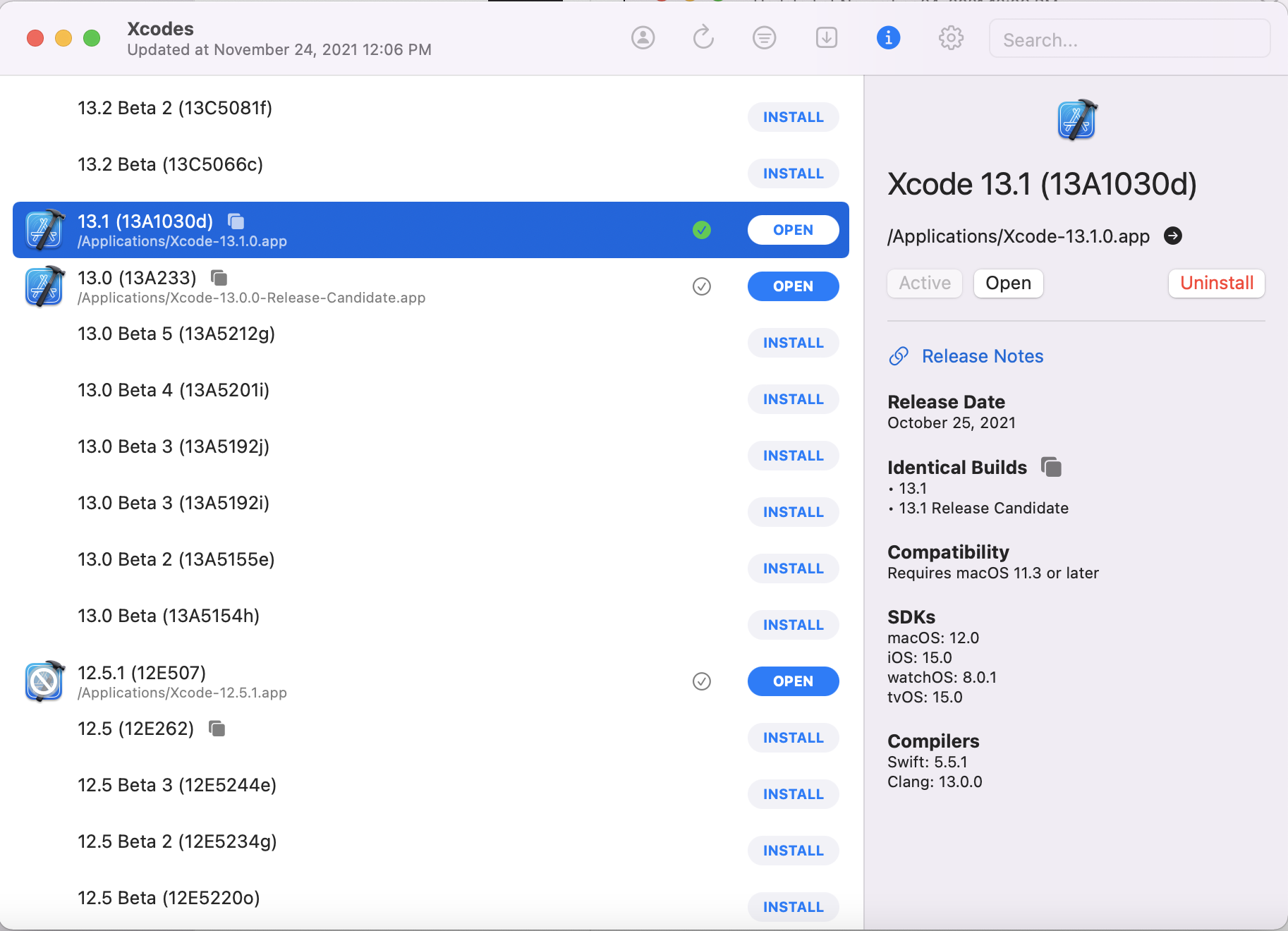
- List all available Xcode versions from Xcode Releases' data or the Apple Developer website.
- Install any Xcode version, fully automated from start to finish. Xcodes uses
aria2, which uses up to 16 connections to download 3-5x faster than URLSession. - Automatically resumes installs if network errors.
- Apple ID required to download Xcode versions.
- Just click a button to make a version active with
xcode-select. - View release notes, OS compatibility, included SDKs and compilers from Xcode Releases.
- Dark/Light Mode supported
Experiments
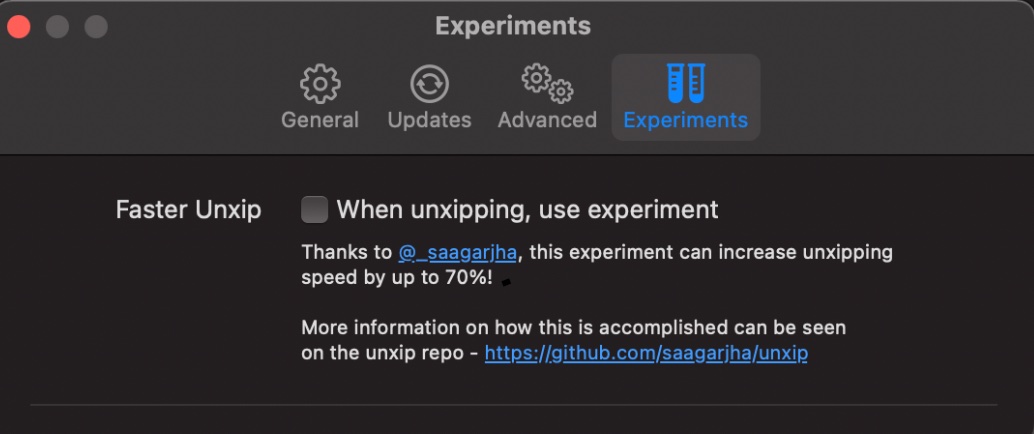
- Thanks to the wonderful work of https://github.com/saagarjha/unxip, turn on the experiment to increase your unxipping time by up to 70%! More can be found on his repo, but bugs, high memory may occur if used.

Localization
Xcodes supports localization in several languages.
The following languages are supported because of the following community users!
| French 🇫🇷 | @dompepin | Italian 🇮🇹 | gualtierofrigerio |
| Spanish 🇪🇸🇲 | @cesartru88 | Korean 🇰🇷 | @ryan-son |
| Russian 🇷🇺 | @alexmazlov | Turkish 🇹🇷 | @egrimo |
| Hindi 🇮🇳 | @KGurpreet | Chinese-Simplified 🇨🇳 | @megabitsenmzq |
| Finnish 🇫🇮 | @marcusziade | Chinese-Traditional 🇹🇼 | @itszero |
| Ukranian 🇺🇦 | @gelosi | Japanese 🇯🇵 | @tatsuz0u |
| German 🇩🇪 | @drct |
Want to add more languages? Simply create a PR with the updated strings file.
Installation
Xcodes.app runs on macOS Big Sur 11.0 or later.
Homebrew Cask
brew install --cask xcodes

# These are Developer ID-signed and notarized release builds and don't require Xcode to already be installed in order to use.
Download a release
- Download the latest version here using the Xcodes.zip asset. These are Developer ID-signed and notarized release builds and don't require Xcode to already be installed in order to use.
- Move the unzipped
Xcodes.appto your/Applicationsdirectory
Development
You'll need macOS 12 Big Sur and Xcode 13 in order to build and run Xcodes.app.
If you aren't a Robots and Pencils employee you'll need to change the CODE_SIGNING_SUBJECT_ORGANIZATIONAL_UNIT build setting to your Apple Developer team ID in order for code signing validation to succeed between the main app and the privileged helper.
Unxip and aria2 must be compiled as a universal binary
# compile for Intel
 swiftc -parse-as-library -O -target x86_64-apple-macos11 unxip.swift
# compile for M1
 swiftc -parse-as-library -O -target arm64-apple-macos11 unxip.swift

# combine for universal binary
 lipo -create -output unxip unxip_intel unxip_m1
# check it
 lipo -archs unxip
Notable design decisions are recorded in DECISIONS.md. The Apple authentication flow is described in Apple.paw, which will allow you to play with the API endpoints that are involved using the Paw app.
xcode-install and fastlane/spaceship both deserve credit for figuring out the hard parts of what makes this possible.
Releasing a new version
Follow the steps below to build and release a new version of Xcodes.app. For any of the git steps, you can use your preferred tool, but please sign the tag.
# Update the version number in Xcode and commit the change, if necessary

# Question: Did anything in XPCHelper change?
# - com.robotsandpencils.XcodesApp.Helper folder and HelperXPCShared
# - if so, bump the version number in com.robotsandpencils.XcodesApp.Helper target.
# Note: you do not have to bump the version number if nothing has changed.
# Note2: If you do bump the version, the end user, must re-install the XPCHelper and give permission again.

# Increment the build number
scripts/increment_build_number.sh

# Commit the change
git add Xcodes/Resources/Info.plist
git commit -asm "Increment build number"

# Tag the latest commit
# Replace $VERSION and $BUILD below with the latest real values
git tag -asm "v$VERSIONb$BUILD" "v$VERSIONb$BUILD"

# Push to origin
git push --follow-tags

# Build the app
# Make sure you have the Xcode Selected you want to build with
scripts/package_release.sh

# Notarize the app
# Do this from the Product directory so the app is zipped without being nested inside Product
# Create a app specific password on appleid.apple.com if you haven't already
# xcrun notarytool store-credentials "AC_PASSWORD" \
#              --apple-id "test@example.com" \
#              --team-id "teamid" \
#               --password "app specific password"

pushd Product
../scripts/notarize.sh Xcodes.zip <MYORG>

# Sign the .zip for Sparkle, note the signature in the output for later
# If you're warned about the signing key not being found, see the Xcodes 1Password vault for the key and installation instructions.
../scripts/sign_update Xcodes.zip
popd

# Go to https://github.com/RobotsAndPencils/XcodesApp/releases
# If there are uncategorized PRs, add the appropriate label and run the Release Drafter action manually
# Edit the latest draft release
# Set its tag to the tag you just pushed
# Set its title to a string with the format "$VERSION ($BUILD)"
# Polish the draft release notes, if necessary
# Add the signature to the bottom of the release notes in a comment, like:
<!-- sparkle:edSignature=$SIGNATURE -->
# Attach the zip that was created in the Product directory to the release
# Publish the release

# Update the [Homebrew Cask](https://github.com/RobotsAndPencils/homebrew-cask/blob/master/Casks/xcodes.rb).
Maintainers

Made with ❤️ by Robots & Pencils