 b90bfd9f46
* Add Linux implementation of VibeTunnel This commit introduces a complete Linux port of VibeTunnel, providing feature parity with the macOS version. The implementation includes: - Full Go-based server with identical REST API and WebSocket endpoints - Terminal session management using PTY (pseudo-terminal) handling - Asciinema recording format for session playback - Compatible CLI interface matching the macOS `vt` command - Support for all VibeTunnel features: password protection, network modes, ngrok integration - Comprehensive build system with Makefile supporting various installation methods - Systemd service integration for running as a system daemon The Linux version maintains 100% compatibility with the existing web UI and can be used as a drop-in replacement for the macOS app on Linux systems. 🤖 Generated with [Claude Code](https://claude.ai/code) Co-Authored-By: Claude <noreply@anthropic.com> * Add comprehensive ngrok integration to Linux VibeTunnel Implements full ngrok tunnel support for the Go/Linux version to match the macOS Swift implementation, enabling secure public access to local VibeTunnel instances. - **ngrok Service**: Complete lifecycle management with status tracking - **HTTP API**: RESTful endpoints matching macOS version - **CLI Support**: Command-line ngrok flags and integration - **Auto-forwarding**: Built-in HTTP request forwarding to local server - `POST /api/ngrok/start` - Start tunnel with auth token - `POST /api/ngrok/stop` - Stop active tunnel - `GET /api/ngrok/status` - Get current tunnel status - Uses `golang.ngrok.com/ngrok` SDK for native Go integration - Thread-safe service with mutex protection - Comprehensive error handling and logging - Real-time status updates (disconnected/connecting/connected/error) - Proper context cancellation for graceful shutdown ```bash vibetunnel --serve --ngrok --ngrok-token "your_token" vibetunnel --serve --port 4030 --ngrok --ngrok-token "your_token" ``` - Added golang.ngrok.com/ngrok v1.13.0 - Updated web packages (security fixes for puppeteer) Maintains full API compatibility with macOS VibeTunnel for seamless cross-platform operation and consistent web frontend integration. 🤖 Generated with [Claude Code](https://claude.ai/code) Co-Authored-By: Claude <noreply@anthropic.com> * up * Fix SSE streaming performance with byte-based approach Addresses @badlogic's review feedback to prevent performance issues with line-based file reading in processNewContent(). ## Changes Made ### Performance Fix - **Byte-based seeking**: Replace line counting with file position tracking - **Efficient reads**: Only read new content since last position using file.Seek() - **Memory optimization**: Avoid reading entire file on each update - **Incomplete line handling**: Properly handle partial lines at file end ### Technical Details - Changed lastLineCount *int → seenBytes *int64 - Use file.Seek(seenBytes, 0) to jump to last read position - Read only new content with currentSize - seenBytes - Handle incomplete lines by adjusting seek position - Maintains same functionality with better performance ### Benefits - **Scalability**: No longer reads entire file for each update - **Performance**: O(new_content) instead of O(total_content) - **Memory**: Constant memory usage regardless of file size - **Reliability**: Handles concurrent writes and partial lines correctly This prevents the SSE streaming from exploding in our faces as @badlogic warned, especially for long-running sessions with large output files. 🤖 Generated with [Claude Code](https://claude.ai/code) Co-Authored-By: Claude <noreply@anthropic.com> * Optimize streaming performance to reduce 1+ second delays Implements multiple optimizations to address user-reported 1+ second delay between typing and stream rendering: ## PTY Reading Optimizations - **Reduced sleep times**: 100ms → 1ms for EOF checks - **Faster polling**: 10ms → 1ms for zero-byte reads - **FIFO optimization**: 1s → 100ms for stdin EOF polling ## UTF-8 Buffering Improvements - **Timeout-based flushing**: 5ms timer for incomplete UTF-8 sequences - **Real-time streaming**: Don't wait for complete sequences in interactive mode - **Smart buffering**: Balance correctness with responsiveness ## File I/O Optimizations - **Immediate sync**: Call file.Sync() after each write for instant fsnotify - **Reduced SSE timeout**: 1s → 100ms for session alive checks - **Better responsiveness**: Ensure file changes trigger immediately ## Technical Changes - Added StreamWriter.scheduleFlush() with 5ms timeout - Enhanced writeEvent() with conditional file syncing - Optimized PTY read/write loop timing - Improved SSE streaming frequency These changes target the main bottlenecks identified in the PTY → file → fsnotify → SSE → browser pipeline. 🤖 Generated with [Claude Code](https://claude.ai/code) Co-Authored-By: Claude <noreply@anthropic.com> * Fix critical stdin polling delay causing 1+ second input lag - Reduced FIFO EOF polling from 100ms to 1ms - Reduced EAGAIN polling from 1ms to 100µs - Added immediate continue after successful writes - This eliminates the major input delay bottleneck 🤖 Generated with [Claude Code](https://claude.ai/code) Co-Authored-By: Claude <noreply@anthropic.com> * Fix critical performance issues causing resource leaks and CPU burns Performance optimizations based on code review feedback: 1. **Fix SSE goroutine leaks**: - Added client disconnect detection to SSE streams - Propagate write errors to detect when clients close connections - Prevents memory leaks from abandoned streaming goroutines 2. **Fix PTY busy-loop CPU burn**: - Increased sleep from 1ms to 10ms in idle scenarios - Reduces CPU wake-ups from 1000/s to 100/s (10x improvement) - Significantly reduces CPU usage when PTY is idle 3. **Multi-stream disconnect detection**: - Added error checking to multi-stream write operations - Prevents goroutine leaks in multi-session streaming These fixes address the "thing of the things" - performance\! 🤖 Generated with [Claude Code](https://claude.ai/code) Co-Authored-By: Claude <noreply@anthropic.com> * Standardize session creation API response format to match Rust server Changes: - Updated Go server session creation response to include success/message/error fields - Now returns: {"success": true, "message": "Session created successfully", "error": null, "sessionId": "..."} - Maintains backward compatibility with existing sessionId field - Go server already supported both input formats (cmdline/command, cwd/workingDir) This achieves protocol compatibility between Go and Rust implementations. 🤖 Generated with [Claude Code](https://claude.ai/code) Co-Authored-By: Claude <noreply@anthropic.com> * Fix delete endpoint to return 200 OK with JSON response - Changed handleKillSession to return 200 OK instead of 204 No Content - Added JSON response with success/message fields for consistency - Fixes benchmark tool compatibility expecting 200 response 🤖 Generated with [Claude Code](https://claude.ai/code) Co-Authored-By: Claude <noreply@anthropic.com> * Update Go server API to match Rust format exactly - Use 'command' array instead of 'cmdline' - Use 'workingDir' instead of 'cwd' - Remove compatibility shims for cleaner API - Better error messages matching Rust server 🤖 Generated with [Claude Code](https://claude.ai/code) Co-Authored-By: Claude <noreply@anthropic.com> * Major performance optimizations for Go server - Remove 100ms artificial delay in session creation (-100ms per session) - Optimize PTY I/O handling with reduced polling intervals - Implement persistent stdin pipes to avoid repeated open/close - Batch file sync operations to reduce I/O overhead (5ms batching) - Remove blocking status updates from API handlers - Increase SSE session check interval from 100ms to 1s Target: Match Rust performance (60ms avg latency, 16+ ops/sec) 🤖 Generated with [Claude Code](https://claude.ai/code) Co-Authored-By: Claude <noreply@anthropic.com> * Fix O_NONBLOCK compilation issue * Add comprehensive TLS/HTTPS support with Caddy integration Features: - Optional TLS support via CLI flags (defaults to HTTP like Rust) - Self-signed certificate generation for localhost development - Let's Encrypt automatic certificate management for domains - Custom certificate support for production environments - HTTP to HTTPS redirect capability - Maintains 100% backward compatibility with Rust version Usage examples: - Default HTTP: ./vibetunnel --serve (same as Rust) - HTTPS with self-signed: ./vibetunnel --serve --tls - HTTPS with domain: ./vibetunnel --serve --tls --tls-domain example.com - HTTPS with custom certs: ./vibetunnel --serve --tls --tls-cert cert.pem --tls-key key.pem 🤖 Generated with [Claude Code](https://claude.ai/code) Co-Authored-By: Claude <noreply@anthropic.com> * Fix terminal sizing issues and implement dynamic resize support Backend changes: - Add handleResizeSession API endpoint for dynamic terminal resizing - Implement Session.Resize() and PTY.Resize() methods with proper validation - Add session registry in Manager to track running sessions with PTY access - Fix stdin error handling to prevent session crashes on EAGAIN errors - Write resize events to asciinema stream for frontend synchronization - Update default terminal dimensions from 80x24 to 120x30 Frontend changes: - Add width/height parameters to SessionCreateData interface - Calculate appropriate terminal dimensions when creating sessions - Implement automatic resize API calls when terminal dimensions change - Add terminal-resize event dispatch for backend synchronization - Ensure resize events bubble properly for session management Fixes nvim being stuck at 80x24 by implementing proper terminal dimension management and dynamic resizing capabilities. 🤖 Generated with [Claude Code](https://claude.ai/code) Co-Authored-By: Claude <noreply@anthropic.com> * Add client-side resize caching and Hack Nerd Font support - Implement resize request caching to prevent redundant API calls - Add debouncing to terminal resize events (250ms delay) - Replace ResizeObserver with window.resize events only to eliminate pixel-level jitter - Add Hack Nerd Font Mono as primary terminal font with Fira Code fallback - Update session creation to use conservative 120x30 defaults - Fix terminal dimension calculation in normal mode 🤖 Generated with [Claude Code](https://claude.ai/code) Co-Authored-By: Claude <noreply@anthropic.com> * Add comprehensive XTerm color and rendering enhancements - Complete 256-color palette support with CSS variables (0-255) - Enhanced XTerm configuration with proper terminal options - True xterm-compatible 16-color theme - Text attribute support: bold, italic, underline, dim, strikethrough, inverse, invisible - Cursor blinking with CSS animation - Font rendering optimizations (disabled ligatures, antialiasing) - Terminal-specific CSS styling for better rendering - Mac option key as meta, alt-click cursor movement - Selection colors and inactive selection support 🤖 Generated with [Claude Code](https://claude.ai/code) Co-Authored-By: Claude <noreply@anthropic.com> --------- Co-authored-by: Claude <noreply@anthropic.com> |
||
|---|---|---|
| .github/workflows | ||
| AppIcon.icon | ||
| assets | ||
| benchmark | ||
| docs | ||
| linux | ||
| scripts | ||
| tty-fwd | ||
| VibeTunnel | ||
| VibeTunnel.xcodeproj | ||
| VibeTunnel.xcworkspace | ||
| VibeTunnelTests | ||
| web | ||
| .github-config | ||
| .gitignore | ||
| .swiftformat | ||
| .swiftlint.yml | ||
| appcast-prerelease.xml | ||
| appcast.xml | ||
| CHANGELOG.md | ||
| CLAUDE.md | ||
| KEYCHAIN_OPTIMIZATION.md | ||
| LICENSE | ||
| Package.swift | ||
| README.md | ||
| test-server.sh | ||
| test-sessions-endpoint.sh | ||
| test-tty-fwd.swift | ||
| VibeTunnel-Info.plist | ||

VibeTunnel
Turn any browser into your Mac terminal. VibeTunnel proxies your terminals right into the browser, so you can vibe-code anywhere.



Why VibeTunnel?
Ever wanted to check on your AI agents while you're away? Need to monitor that long-running build from your phone? Want to share a terminal session with a colleague without complex SSH setups? VibeTunnel makes it happen with zero friction.
"We wanted something that just works" - That's exactly what we built.
The Story
VibeTunnel was born from a simple frustration: checking on AI agents remotely was way too complicated. During an intense coding session, we decided to solve this once and for all. The result? A tool that makes terminal access as easy as opening a web page.
Read the full story: VibeTunnel: Turn Any Browser Into Your Mac Terminal
✨ Key Features
- 🌐 Browser-Based Access - Control your Mac terminal from any device with a web browser
- 🚀 Zero Configuration - No SSH keys, no port forwarding, no complexity
- 🤖 AI Agent Friendly - Perfect for monitoring Claude Code, ChatGPT, or any terminal-based AI tools
- 🔒 Secure by Design - Password protection, localhost-only mode, or secure tunneling via Tailscale/ngrok
- 📱 Mobile Ready - Check your terminals from your phone, tablet, or any computer
- 🎬 Session Recording - All sessions are recorded in asciinema format for later playback
Quick Start
1. Download & Install
Download VibeTunnel and drag it to your Applications folder.
2. Launch VibeTunnel
VibeTunnel lives in your menu bar. Click the icon to start the server.
3. Use the vt Command
Prefix any command with vt to make it accessible in your browser:
# Monitor AI agents
vt claude

# Run development servers
vt npm run dev

# Watch long-running processes
vt python train_model.py

# Or just open a shell
vt --shell
4. Open Your Dashboard
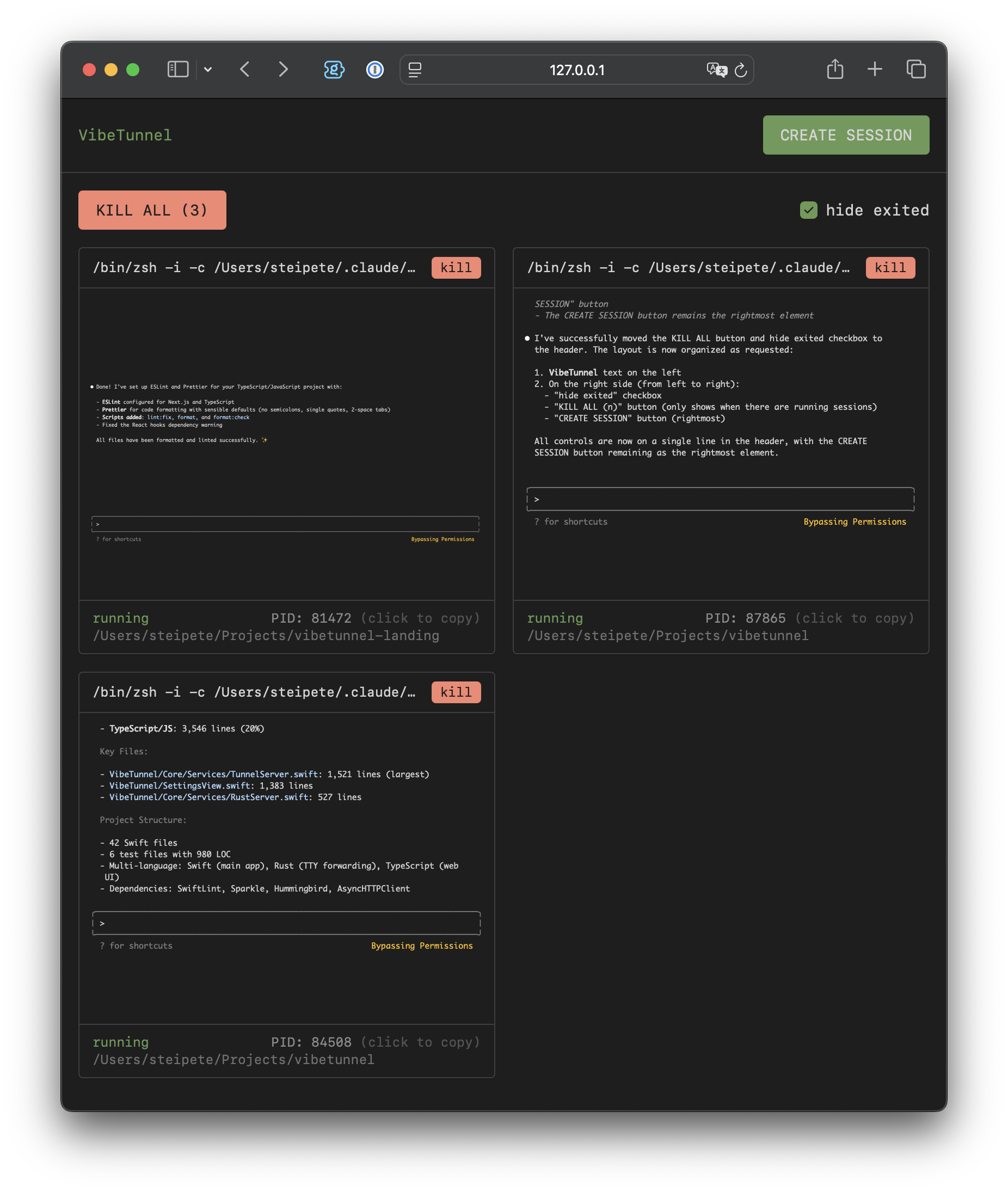
Visit http://localhost:4020 to see all your terminal sessions in the browser.
Real-World Use Cases
🤖 AI Development
Monitor and control AI coding assistants like Claude Code remotely. Perfect for checking on agent progress while you're away from your desk.
vt claude --dangerously-skip-permissions
🛠️ Remote Development
Access your development environment from anywhere. No more "I need to check something on my work machine" moments.
vt code .
vt npm run dev
📊 System Monitoring
Keep an eye on system resources, logs, or long-running processes from any device.
vt htop
vt tail -f /var/log/system.log
🎓 Teaching & Collaboration
Share terminal sessions with colleagues or students in real-time through a simple web link.
Remote Access Options
Option 1: Tailscale (Recommended)
- Install Tailscale on your Mac and remote device
- Access VibeTunnel at
http://[your-mac-name]:4020from anywhere on your Tailnet
Option 2: ngrok
- Add your ngrok auth token in VibeTunnel settings
- Enable ngrok tunneling
- Share the generated URL for remote access
Option 3: Local Network
- Set a dashboard password in settings
- Switch to "Network" mode
- Access via
http://[your-mac-ip]:4020
Command Options
# Claude-specific shortcuts
vt --claude              # Auto-locate and run Claude
vt --claude-yolo         # Run Claude with dangerous permissions

# Shell options
vt --shell               # Launch interactive shell
vt -i                    # Short form for --shell

# Direct execution (bypasses shell aliases)
vt -S ls -la            # Execute without shell wrapper
Configuration
Access settings through the menu bar icon:
- Server Port: Change the default port (4020)
- Launch at Login: Start VibeTunnel automatically
- Show in Dock: Toggle between menu bar only or dock icon
- Server Mode: Switch between Rust (default) or Swift backend
Architecture
VibeTunnel is built with a modern, secure architecture:
- Native macOS app written in Swift/SwiftUI
- High-performance Rust server for terminal management
- Web interface with real-time terminal rendering
- Secure tunneling via Tailscale or ngrok
For technical details, see ARCHITECTURE.md.
Building from Source
# Clone the repository
git clone https://github.com/amantus-ai/vibetunnel.git
cd vibetunnel

# Build the Rust server
cd tty-fwd && cargo build --release && cd ..

# Build the web frontend
cd web && npm install && npm run build && cd ..

# Open in Xcode
open VibeTunnel.xcodeproj
Local Development Setup
For local development, configure your development team ID in Local.xcconfig. Without this, you'll face repeated permission and keychain dialogs, especially with ad-hoc installations. With proper code signing, these dialogs only appear on first launch.
To get your team ID:
security find-identity -v -p codesigning
Then copy Local.xcconfig.template to Local.xcconfig and insert your team ID. This file is gitignored to keep your personal settings private.
Credits
Created with ❤️ by:
- @badlogic - Mario Zechner
- @mitsuhiko - Armin Ronacher
- @steipete - Peter Steinberger
Contributing
We welcome contributions! Please see our Contributing Guide for details.
License
VibeTunnel is open source software licensed under the MIT License. See LICENSE for details.
Ready to vibe? Download VibeTunnel and start tunneling!